TDPT – Three D Pose Tracker – iOS Edition
When you input footage or video from a normal camera, our in-house developed image-recognition AI technology (deep learning) detects 24 body keypoints and outputs them as 3D coordinates with real-time motion capture using the TDPT (ThreeD Pose Tracker) system. This “TDPT system” has also attracted attention through academic presentations, published papers, and joint research.
Using the coordinates output by the TDPT system, the iOS version of TDPT allows you to manipulate an avatar’s bone rotations so that you can perform full-body tracking with just an iPhone — without attaching trackers to your body. It is widely used for VTuber activities, expressive motion in the metaverse, and more.
The app is free to download, and it also offers optional Premium Menu features available via one-time purchases. The Premium Menu adds functions such as switching avatars from VRoidHub, live streaming, motion data transmission, and export.
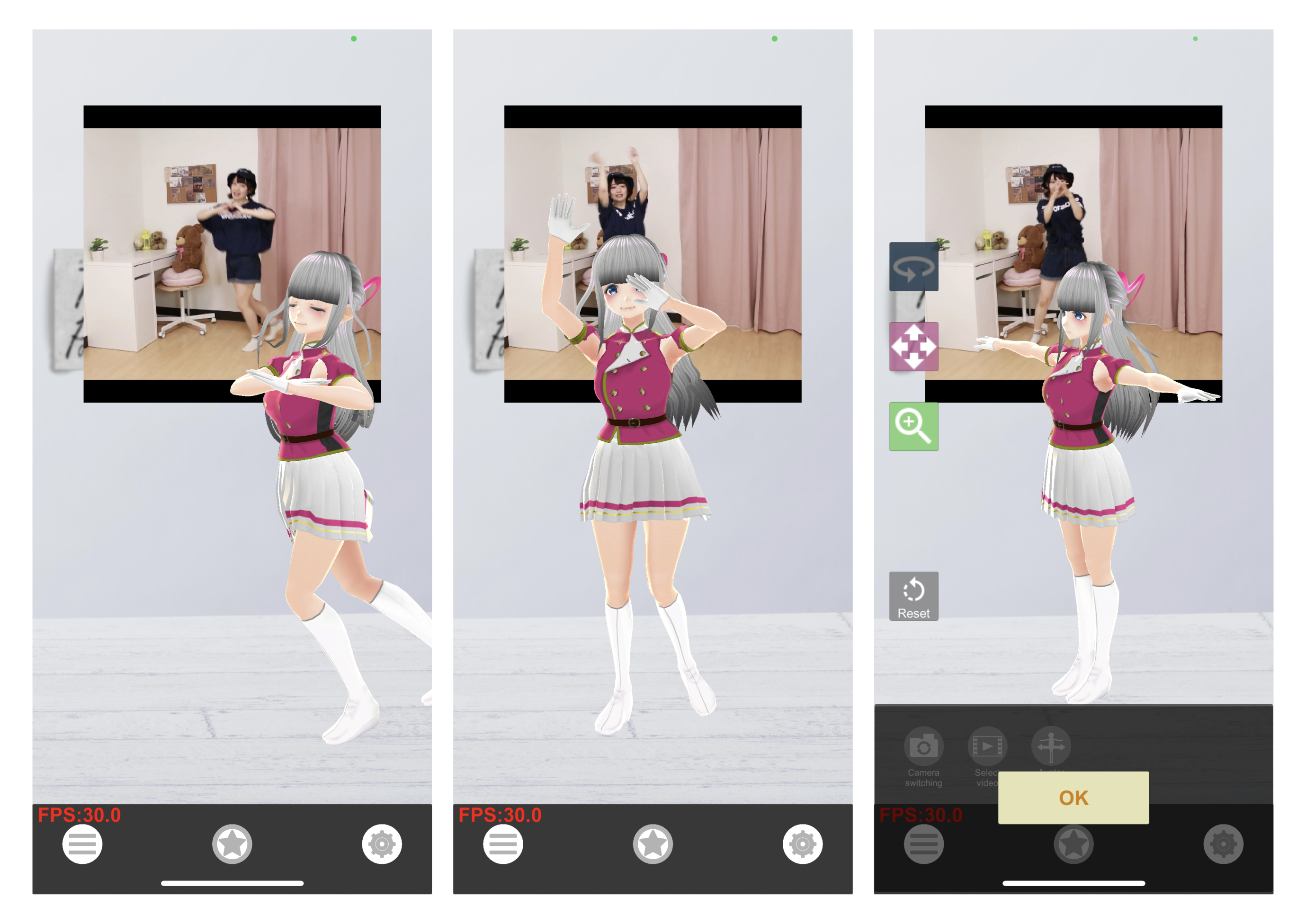
App screen image
Features
Menu Buttons
-
- Camera Switch
Toggle between front and rear cameras and adjust field of view.
-
- Select Input Video
Choose any video from the iOS “Files” app for real-time motion capture.
-
- Avatar Movement Mode
Rotate, move, and scale the avatar.

Settings Screen
-
- Toggle Background Display
Turn ON to show a background image, OFF to use a green screen.
-
- Background Image Selection
Choose any picture from the “Photos” app.
-
- Select Avatar from Files
Load .vrm avatar data from the iOS “Files” app. (Please observe avatar license terms if not using your own.)
-
- Revert to Default Avatar
- Toggle Input Video Display
ON to show the camera/video image, OFF to hide it.
-
- Adjust Video Volume
- Microphone Activation
When ON, the avatar’s mouth moves (also affects live stream audio).
-
- FPS Display Toggle
Show or hide the frame-rate indicator.
Premium Menu Features
- Connect with VRoidHub
Link your VRoidHub account to use your own or favorited avatars (certain conditions apply). →TDPT – VRoidHub)
- Motion Data Transmission via VMC Protocol
Enter a destination ID and port to send motion data.
- Live Streaming
Please follow the terms of each streaming platform.
+ Mirror Streaming via ReplayKit
Works with apps that support mirroring.
+ RTMP Streaming
Can stream via services like YouTube encoder live (~10 fps).
- Export Motion Data
Export in VMD or BVH formats.

Supported Devices
iPhone models released since iPhone 11
Contact & Support
(General inquiries only.)
For inquiries, support is available Monday to Friday, 10:00 – 18:00 (excluding weekends and holidays).